
Last updated: November 1, 2026.
In the previous chapter we talked about how Google discovers a page, in other words crawling.
This chapter’s concept: indexing
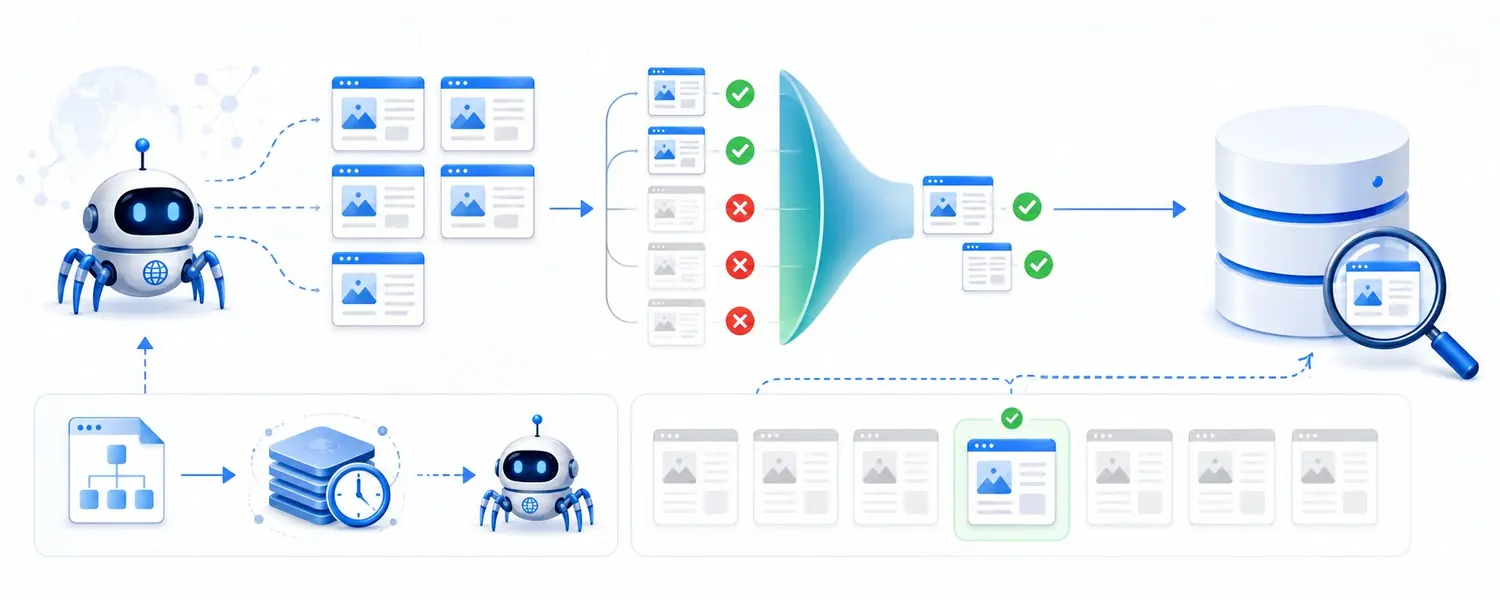
Googlebot crawling a page doesn’t mean that page will definitely appear in Google. After crawling, Google tries to understand the page’s content. It evaluates these elements on the page:
- The text
- The headings
- The images
- The links
- The overall topic of the page
If it decides the page is worth showing in search results, it can add it to Google’s index. We call this process indexing.
In its simplest form:
- Crawling: Google found the page and visited it.
- Indexing: Google added the page to its index.
There’s an important point here:
Google doesn’t have to index every page it crawls.
In fact, one of the biggest SEO problems we see on many websites today is pages not getting indexed at all, or getting indexed very late. You publish a piece of content, but Google may not include it in search results for hours, days or sometimes even longer. So creating good content isn’t enough on its own.
Google needs to discover that content, crawl it and decide it’s worth indexing.
Google says this openly too: even if your page follows Google’s Search Essentials, Google doesn’t guarantee that it will crawl, index or serve it (Google).
What does Google do during indexing?
According to the same Google page, the process works roughly like this:
- During the crawl, it renders the page and runs any JavaScript on it. That way it sees the page much like a browser would.
- It groups the similar pages it has found on the internet into clusters and picks the page that best represents each group as the main page (canonical).
- It collects signals such as the language of the page, the country the content is meant for and the usability of the page.
Google also points out that not every page it processes will be indexed. Common reasons include low-quality content, robots meta rules that don’t allow indexing and a site design that makes indexing difficult.
The second point is Google’s side of the “I already have something like this” situation I describe below.
Why doesn’t a page get indexed?
There can be many reasons a page doesn’t get indexed:
- The page may have a noindex tag.
- The canonical may point to another URL.
- Google may not be able to access the page properly because of a technical problem.
- The content may be very thin.
- The page may be new and Google may not have processed it yet.
We can roughly group these reasons into five categories:
| Reason | What’s happening? | How do we know? |
|---|---|---|
| Quality | The content is thin or adds nothing to pages Google already knows. | “Crawled – currently not indexed” in Search Console |
| Duplicate / canonical | The page is treated as a copy or near-copy of another page, and Google uses a different URL as the main one. | “Alternate page with proper canonical tag”, “Duplicate, Google chose different canonical than user” |
| noindex | The page has a tag telling Google “Don’t index this page.” | “Excluded by ‘noindex’ tag” |
| Technical error | The page returns a 404, the server returns an error or the redirect is broken. | “Not found (404)”, “Server error (5xx)”, “Redirect error” |
| Crawling issue | Google can’t reach the page, or knows the URL but hasn’t crawled it yet. | “Blocked by robots.txt”, “Discovered – currently not indexed” |
There’s one more issue I think deserves special attention:
If Google has already indexed a page very similar to yours, it may not index the new page separately.
For example, imagine you have 10 different pages covering the same topic. Even if the wording changes a bit, if these pages basically answer the same need, Google may treat them as similar to each other. In that case Google may say “I already have something like this,” pick one of the URLs as the main one and not index the others separately.
These are examples to watch out for in particular:
- Product pages that are very similar to each other
- Filter and parameter URLs
- Content that covers the same topic over and over
- Similar pages created by just swapping the city or district name
- Category pages that barely differ from each other
So the question isn’t only “Is this page high quality?” You also need to ask “What does this page offer that’s different from the pages Google already knows?”
A short introduction to noindex and canonical
Two concepts come up often in the table above. Since both directly affect indexing, I want to explain them briefly.
noindex is an instruction in the page’s code telling Google “You can crawl this page, but don’t index it.” It’s usually written in the page’s <head> section like this:
<meta name="robots" content="noindex">It’s useful for pages we don’t want to appear in Google, such as thank-you pages, internal site search results or test pages. The problem is when this tag gets left on important pages by mistake. You also need to know this: Google can only see the noindex tag if it can crawl the page. If the page is blocked by robots.txt, Google can’t read the tag (Google).
Canonical is the tag we use to tell Google which page is the main one among pages that are very similar to each other. Let’s take a coffee machine category. When a color filter is selected, the address becomes site.com/coffee-machines?color=black, but most of the page is the same. By putting a tag like this on the filter page, we can indicate that the category is the main page:
<link rel="canonical" href="https://site.com/coffee-machines/">There’s an important detail here: canonical isn’t an instruction, it’s a strong signal. Google can look at other signals and choose a different URL as the main page (Google). I cover noindex and how it differs from robots.txt in Chapter 23, and canonical and index bloat in Chapter 25.
How do we check whether a page is indexed?
So how do we check whether a page is indexed or not? The most reliable method is the URL Inspection tool in Google Search Console.
But you can also do a quick check on Google itself. For example, to see the indexed pages about WinRAR on indir.com, a Turkish software download site, you can search for this:
site:indir.com winraror you can search directly for part of the URL. This gives you a quick check, but for a definitive answer it’s better to use Search Console. I cover site: and other search operators in Chapter 7.
In Search Console you’ll sometimes see the statuses Crawled – currently not indexed or Discovered – currently not indexed.
The two look similar but they’re not the same thing:
- Discovered: Google knows the URL but hasn’t crawled it yet.
- Crawled: Google has crawled the page but hasn’t indexed it for now.
The Page indexing report in Search Console
URL Inspection is good for looking at a single page. To look at the site as a whole, we use the Page indexing report in Search Console. This report splits the URLs on your site into two groups: Indexed and Not indexed. Under the URLs that aren’t indexed, the reason for each one is listed separately (Search Console Help).
When you first open this report, don’t let a high “Not indexed” number scare you. Google itself says we shouldn’t expect every URL on a site to be indexed. Filter pages, redirects, duplicates we’ve set a canonical for and pages we’ve marked noindex should be on this list anyway. The goal isn’t for every URL to be indexed, but for the main (canonical) version of your important pages to be in the index.
When I read this report, I find it useful to go in this order:
- First, look at the list of reasons and see how many URLs are under each one.
- Go into each reason and review the example URLs. Is there an important product, category or content page in there?
- If an important page is on the list by mistake because of noindex, a 404 or a redirect, fix that first.
- For important pages under “Crawled – currently not indexed,” question whether the content is really different and substantial enough.
- After making a fix, request indexing for the page in URL Inspection.
I cover Search Console and all its reports in Chapter 29.
Late indexing: a news site example
We also had an interesting experience with late indexing. A client of ours, one of Turkey’s major news sites, had a serious late indexing problem. Because it’s a news site, even minutes matter here.
For a long time we looked for the cause in places we didn’t expect, and we finally found a rather interesting detail. To keep the load on the server down, the developers had put a 10-minute cache on the sitemap.
So when a new story was published, the page was live, but the sitemap didn’t show Google the updated version right away. Even if you published one piece of content every second, Google could only see the new URLs in the sitemap once the cache refreshed at the earliest.
When we cut the cache time from minutes down to seconds, the late indexing problem was largely solved. It wasn’t that the pages weren’t getting indexed. They were getting indexed late. Since competition on a news site is measured in minutes, that delay meant the traffic wasn’t coming in. The day after we fixed the problem, traffic went up by around 23%.
This wasn’t an error any SEO tool showed us. Our problem was late indexing; we analyzed where it could be coming from and reached the solution that way. I cover how we look for this kind of problem that tools can’t see in Chapter 32.
This example reminded me of something once again:
Indexing problems don’t always come from the content.
Sometimes a technical detail that looks tiny can turn into a serious SEO problem, especially on sites that publish content very quickly.
And once a page is indexed, the work isn’t over. Now a different question begins:
For which searches, and in what position, will Google show this page?
Practice
- Open the Page indexing report in Search Console. Is any of your important pages under the reasons listed in “Not indexed”?
- Check your 3 most important pages in URL Inspection. Are they in the index, and is the canonical Google chose the same as the one you chose?
- Are the pages on your site that should be noindex (thank-you, internal site search, test) actually noindex? Has the tag been left on a page that shouldn’t have it?
- Do your filter and parameter URLs point their canonical to the main page?
- List your pages that are very similar to each other. Does each one answer a different need, or could they be merged?
Previous: Chapter 1: Crawling · Contents · Next: Chapter 3: Ranking
This chapter was first published in Turkish on X (August 29, 2026).