

Last updated: November 1, 2026.
In the first chapter we put it this way: if Google doesn’t crawl you, doesn’t index you and can’t find you for relevant searches, it is very hard to become a source in AI Overviews.
This chapter unpacks that sentence. We will briefly pull together the SEO foundation you need in order to understand AI search: How does a search engine find a page? Why does it index it or not? Which page does it bring to the top, and why? And where does AI enter this chain?
If you have been doing SEO for a long time, you already know most of these topics. I still recommend reading on, because I will look at every topic through one question: “What does this change in AI search?” Some old knowledge takes on a completely different weight when you ask that question.
1. AI doesn’t read the internet on its own
The most common misconception about AI search goes like this: “ChatGPT knows the internet, Gemini reads everything.”
In reality, an AI that needs live information to write an answer is also connected to a search engine. Google’s AI Overviews and AI Mode ground their answers in pages from Google’s search index. ChatGPT has its own search crawler. Microsoft Copilot uses Bing’s index.
Google says this very clearly in its own documentation: to be shown as a source in AI Overviews or AI Mode, a page must be indexed in Google and eligible to be shown in search results with a snippet. There are no additional technical requirements beyond that (Google Search Central).
To me, this sentence sums up the technical side of this book. There is no separate technical SEO for AI. But the price of a classic technical SEO mistake is now paid twice: once in the search results and again in AI answers.
2. A search engine works in four steps, and AI adds a fifth
Roughly speaking, a page goes through four steps before it reaches the search results:
- Discovery and crawling (Crawl): The search engine learns that the page exists and visits it.
- Indexing (Index): It reads the page, understands what it is about and decides whether to add it to its index.
- Ranking (Ranking): When someone searches, it selects the most relevant pages from the index and orders them.
- Serving (Serving): It shows the page on the results page with a title, a description and, where relevant, rich results.
AI search adds one more step to the end of this chain: retrieval and writing. The AI splits the user’s question into sub-searches through query fan-out, retrieves pages from the results of those searches and writes the answer from those pages.
The critical point is this: the fifth step works on the output of the first four. A page that isn’t crawled doesn’t get indexed. A page that isn’t in the index doesn’t rank. And a page that doesn’t rank, that can’t be found for any of the sub-searches, can’t make it into the sources the AI retrieves.
You also have a control at every step. You manage crawling with robots.txt, indexing with noindex and canonical, and what is shown in the results with tags like nosnippet. In the rest of this chapter we will go through these steps and controls one by one.
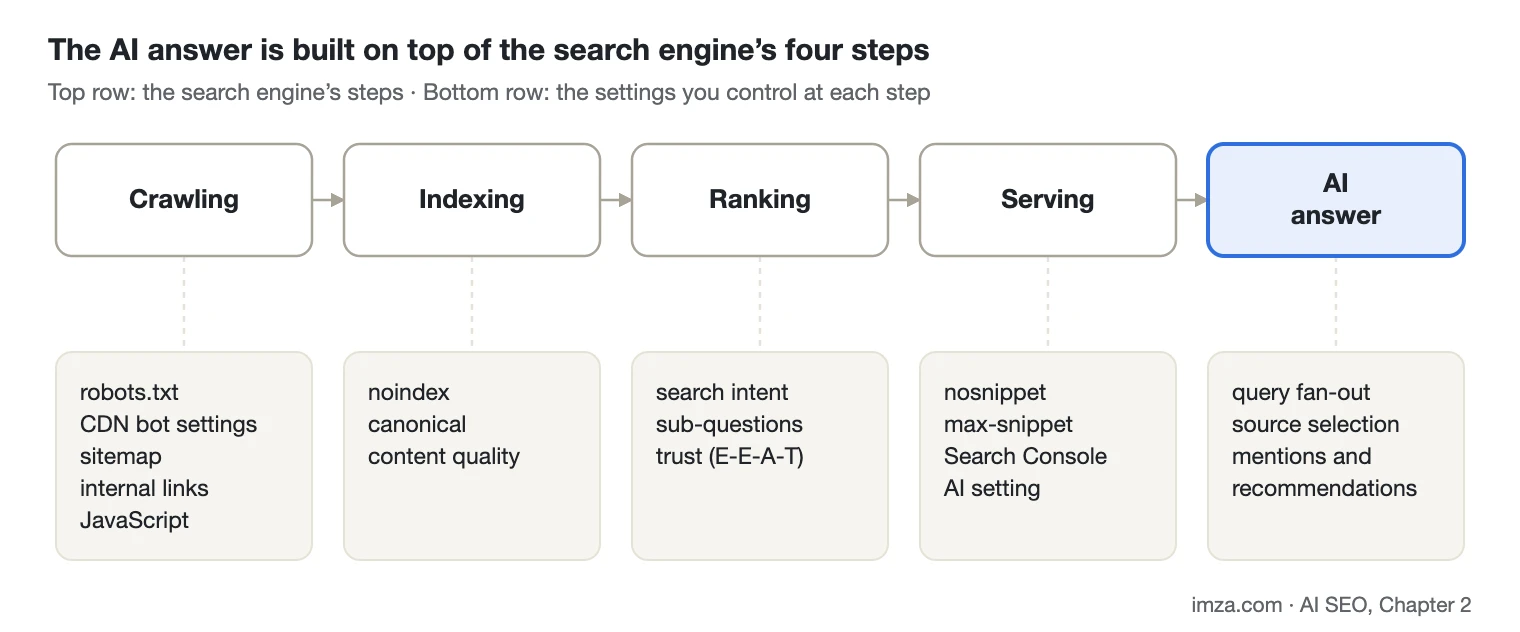
Each step in the top row works on the output of the previous one; the bottom row shows the settings you control at that step.
3. Crawling: How does Google find your page?
There are two main ways Google learns about a new page: links and the sitemap.
You publish a new page and link to it from the homepage, a category page or another article. Googlebot follows that link and discovers the page. Pages that receive no links from anywhere are much harder to discover. We call these orphan pages.
A sitemap is the file in which you tell Google, “These addresses matter to me.” But it is not a guarantee. Adding a page to the sitemap doesn’t mean Google will definitely crawl it or index it. It is a strong discovery signal, nothing more.
We saw how much a small crawling setting can matter on a news site. New articles were reaching Google late. While going through the technical side, we found that the sitemap was cached for about 10 minutes to reduce server load. An article was published at 10:00 and appeared in the sitemap around 10:10. Once we brought the cache time down to seconds, the delay largely disappeared.
From an AI point of view, this example becomes even more important. A user asks AI Mode a question about something current, and the AI answers with whatever is in the index at that moment. If your page hasn’t been crawled yet, it writes the answer from your competitor’s page. Crawl speed can decide whether you are a source for current questions.
Large sites also have to think about crawl budget. Google doesn’t spend unlimited time and resources on a single site. If Googlebot spends its time on worthless addresses on an e-commerce site that generates millions of filter and parameter URLs, the crawling of important pages can be delayed. Google’s AI guide also points large and frequently updated sites specifically to its crawl budget guide (Google Search Central).
4. robots.txt: Know what you are blocking
robots.txt is the file in the root of your site where you tell crawlers, “You may enter these sections, stay out of those.”
The first rule here: robots.txt controls crawling, not indexing. When you block a page with robots.txt, Google can’t read its content. But if it has learned the address from somewhere else, the page can still appear as a result without a description. If you definitely don’t want a page to appear in search results, the right tool is noindex. We will cover that in a later section.
From an AI point of view, the second rule is more important: Blocking Googlebot also means leaving AI Overviews and AI Mode. Google states that Googlebot rules are the way to manage crawl access for its AI features (Google Search Central). Google doesn’t have a separate “AI bot” for search.
One thing is often confused here: Google-Extended. It isn’t a crawler; it is a control token used in robots.txt. By blocking Google-Extended, you limit the use of your content for training and grounding in some of Google’s other AI systems. But it doesn’t affect Google Search. In other words, you can’t leave AI Overviews by blocking Google-Extended.
One of the most classic robots.txt mistakes in SEO has nothing to do with AI: the “Disallow: /” line from the staging environment being carried over to the live site. The site launches, everything works, but Google can’t crawl a single page. That is why checking robots.txt should be one of the first things you do after launching a new site or a major update.
5. Not every AI bot does the same job
AI companies other than Google use different bots for different jobs. Broadly, there are three kinds:
- Training bots: Collect content to be used in training future models.
- Search bots: Crawl and index content so it can be shown in the AI’s search feature.
- User bots: Visit a page at the moment a user asks a question or shares a link.
The best-known ones are:
| Company | Training | Search | User request |
|---|---|---|---|
| Google-Extended (a control token, not a bot) | Googlebot | Googlebot | |
| OpenAI | GPTBot | OAI-SearchBot | ChatGPT-User |
| Anthropic | ClaudeBot | Claude-SearchBot | Claude-User |
| Microsoft | Bingbot |
This distinction matters, because blocking one doesn’t mean blocking the others. OpenAI states plainly that you can block GPTBot in robots.txt and allow OAI-SearchBot, meaning you can keep your content out of training and still appear in ChatGPT search. If you do the opposite and block OAI-SearchBot, your site won’t be shown as a source in ChatGPT’s search answers; at most it can appear as a navigational link (OpenAI). Anthropic separates its three bots in the same way and notes that blocking Claude-SearchBot may reduce visibility in search results (Anthropic).
For most sites, I think the sensible approach is this: Keep the door open to search bots. Decide on training bots based on your business model. A news site or a publisher that earns money from its content may want to block training bots. A manufacturer or an e-commerce site usually wants AI to understand its brand correctly.
There is one more thing to watch: robots.txt isn’t the only control point. Bot rules on the server, in security plugins and at the CDN kick in before robots.txt, and site owners often don’t notice them. Let’s look at this in the next section through the most common example, Cloudflare. We will cover bots and log analysis in detail in Chapter 9.
6. Cloudflare: Your infrastructure may be blocking bots, not you
robots.txt is a request. A bot comes to your site, reads the file and either follows the rules or doesn’t. A CDN like Cloudflare, on the other hand, handles the request before it ever reaches your server. So even if your robots.txt says “come in”, the CDN can turn the bot away at the door. The bot never sees your page, and most of the time you won’t see any trace of it in Search Console or your analytics tools either.
I am giving Cloudflare its own section because it is very widely used and because it has changed its default settings for AI bots several times in the last year and a half:
- April 2025, managed robots.txt: Cloudflare can add rules aimed at AI bots to the top of your robots.txt file. So the robots.txt you see in WordPress or on your server may not be the same file you see in the browser at site.com/robots.txt.
- July 2025, blocking by default: Cloudflare started blocking AI crawlers by default on newly added domains and put the “Block AI bots” option front and center. A screen clicked through quickly during setup can mean the site is closed to AI bots.
- July 2026, three categories: Cloudflare no longer manages bots as a single “AI bot” group but in three groups by function: Search, Agent (AI agents that open pages on a user’s behalf) and Training (model training). From September 15, 2026, on new domains, Training and Agent bots are blocked by default on pages that show ads, while Search bots stay allowed.
The last point has a critical detail for SEO. According to Cloudflare’s announcement, multi-purpose bots used for both search and training are subject to both policies. If you block Training, bots like Googlebot, Bingbot and Applebot can also be blocked, even with Search allowed. As we saw in section 4, a site closed to Googlebot drops out of both Google Search and AI Overviews. So a decision made to stop AI from training on your content can, without anyone noticing, make your site disappear from Google.
The Agent category deserves its own thought too. When a user gives ChatGPT or Claude a link to your page and says “summarize this”, the bot that opens the page falls into this group. If you block it, your content can’t be read even for a user who has already found you.
If you use Cloudflare, or your client’s site sits behind Cloudflare, check the following:
- Bot settings: Look at the security and bot settings in the Cloudflare dashboard, and at AI Crawl Control if it is available. Make clear which decision is selected for Search, Agent and Training, and whether it was a deliberate decision.
- Live robots.txt: Read the file in the browser at site.com/robots.txt, not on the server. If there are lines you didn’t write, the source is most likely the CDN.
- Googlebot access: Run the live test in Search Console’s URL Inspection. If the page can’t be fetched or there is a blocked warning, look at the CDN rules. Run the same check in Bing Webmaster Tools.
- Blocked requests: Cloudflare’s security events screen shows which bots are being blocked. Tests where you imitate a bot’s identity in your own browser can be misleading, because Cloudflare recognizes verified bots by IP address and signature.
This isn’t limited to Cloudflare. Other CDNs, hosting firewalls and WordPress security plugins offer similar options. The common rule: if you made your AI bot decision in robots.txt and left it there, also check that every layer in between applies the same decision.
7. JavaScript: Googlebot sees it, others may not
A large share of modern sites build their content in the browser with JavaScript. The page’s initial HTML contains no price, product specifications or reviews; JavaScript adds them after the page opens.
Google can process these pages. Googlebot runs JavaScript and renders the page like a browser. Google’s guide also says it can process this content as long as JavaScript isn’t blocked, but that optimizing JavaScript-based sites is generally more complex (Google Search Central).
The situation can be different for other AI bots. When Vercel analyzed the bot traffic on its own network at the end of 2024, it found that GPTBot, ClaudeBot and PerplexityBot did not run JavaScript. These bots downloaded JavaScript files but didn’t execute them. The ones that processed JavaScript were Gemini, which uses Googlebot’s infrastructure, and AppleBot (Vercel). This picture may change over time, but for today the safe assumption is:
Your important information should be in the page’s initial HTML. Price, stock, technical specifications, product description, contact details and the answers to frequently asked questions should be readable without JavaScript running. Otherwise Google may understand you correctly while ChatGPT or Claude sees an empty page.
The simplest way to check this is to right-click the page in your browser, choose “View page source” and look for the important information there. Information you can’t see there can’t be seen by a bot that doesn’t run JavaScript either. If you use frameworks like Next.js or Nuxt, server-side rendering or pre-rendering solves this problem.
8. Indexing: Google won’t index what it hasn’t crawled, or what it crawled and didn’t like
Crawling and indexing aren’t the same thing. Google can crawl and read a page and still not add it to its index.
There are a few common reasons: The page may be a copy of another page or very similar to it. The content may be very thin. The page may carry a noindex tag. Or Google may simply not have found the page worth indexing. The “Crawled – currently not indexed” message in Search Console usually describes this last case.
From an AI point of view, the result is simple: A page that isn’t in the index can’t be a source in AI Overviews, however good it is. If the page that best explains your product isn’t in the index, the AI learns about you from another page, perhaps a listings site or your competitor’s comparison article.
When it comes to indexing, more pages isn’t always better. Filmler.com had about 450,000 cast and crew records. Instead of opening all of them to indexing, we opened only the pages that had content and enough value. Unnecessary pages bloat the index, waste crawl budget and can give a false impression of the site’s overall quality.
In AI search, this decision has one more dimension: every page you open to indexing is a source the AI can read about your brand. Empty pages or pages with outdated information can also lead to your brand being described wrongly.
9. noindex and canonical: You decide which page is shown
If you don’t want a page to appear in search results, the tool to use is the noindex tag. When Googlebot crawls the page and sees this tag, it removes the page from the results. A page with noindex naturally can’t be a source in AI features either.
There is a small but critical detail to know here: for Google to see the noindex tag, it has to be able to crawl the page. If you both block a page with robots.txt and give it noindex, Google may not be able to see the noindex because it can’t get into the page.
The canonical tag is the one you use when there are several addresses with the same or very similar content, to tell Google which one is the main address. If a product has five different addresses opened by a color filter, you consolidate the strength in a single address with canonical.
Canonical is a signal, not a directive. Google can look at other signals and choose a different page as the main address. The URL Inspection tool in Search Console shows which address Google has chosen. If you see an old or filtered address cited in an AI answer instead of the page you wanted, this is one of the first places to look.
10. Snippet controls and the new setting in Search Console
Let’s go back to Google’s second requirement for AI features: the page must be eligible to be shown with a snippet.
A snippet is the description text that appears under the title in a search result. Site owners have been able to control it with a few tags for years:
- nosnippet: Don’t show any text preview from this page.
- max-snippet: The preview may be at most this many characters.
- data-nosnippet: Don’t use this particular part of the page in the preview.
Google says the same tags can be used to limit what is shown from your page in AI Overviews and AI Mode (Google Search Central). So if you use these tags carelessly, you can drop out of AI answers too. Keep in mind that some SEO plugins or themes may switch these tags on by default; a quick look at the “robots” meta tag in the page source is enough.
There is also a new setting. In June 2026, Google started adding a control to Search Console that lets you choose whether your site appears in AI features. As of August 31, 2026, it is available to all sites (Google). With this setting you can opt out of AI Overviews, AI Mode and AI Overviews in Discover. Google says the setting won’t be used as a ranking signal in regular search results, but that sites that opt out won’t get traffic or impressions from these features.
For most businesses, I think it makes sense to keep this setting on. As we saw in Chapter 1, visitors from AI are few but valuable. Still, for publishers who earn money directly from their content, this is a decision worth thinking about. What matters is knowing what state the setting is in and making a deliberate decision.
11. Ranking: The page that answers the right question
Hundreds of signals decide which of the billions of pages in the index comes to the top. But I think the same question always sits at the center of ranking: Does this page actually answer the user’s question?
To answer that, you first need to understand the intent behind the question. Search intent is usually described in four groups:
- Informational: The user wants to learn something. “How does a filling machine work?”
- Research and comparison: They are weighing options. “Piston filler or diving nozzle?”
- Transactional: They want to buy or request a quote. “Filling machine price quote”
- Navigational: They want to reach a specific site. “X machinery contact”
If the user is looking for information, your product page may not be the right answer; if they are ready to buy, your blog post may not be. You may have written very good content, but if it answers the wrong question, ranking will be hard.
AI search makes this even more important. Query fan-out splits the user’s single question into several sub-searches, and every sub-search has its own intent. Behind the scenes, the question “Which filling machine for a foaming product?” can turn into informational (“how to fill foaming liquids”), comparison (“types of filling machines”) and transactional (“filling machine manufacturers”) searches. As we discussed in Chapter 1, a large share of the pages cited as sources come from these sub-searches.
That is why your site needs pages that give clear answers not only to the main keyword but also to the sub-questions users ask while making a decision. We do that not by opening a separate page for every sub-question, but by making our pages truly complete.
12. Trust: Whom does Google believe, and whom does AI believe?
For years, Google has used four concepts to describe content quality: Experience, Expertise, Authoritativeness and Trustworthiness. E-E-A-T for short.
These aren’t a ranking factor on their own; they are how Google describes high-quality content. Who wrote the content? Does that person have real experience with the subject? Is the site known for this topic? Is the information accurate and up to date?
In AI search, these questions carry more weight. Because AI writes an answer in its own words, if it relies on a wrong source, it says the wrong thing in its own voice. Google’s AI guide also emphasizes the importance of content that isn’t commodity content, that brings an original perspective and first-hand experience (Google Search Central).
In practice, this means pages that make clear who wrote them, show the author’s expertise, back up their claims with sources, carry an update date and openly provide information showing the company really exists (address, contact details, references). We will discuss this in detail in Chapters 12 and 13, on content that can’t be copied and on the brand.
13. Page experience: If the site doesn’t load, nothing else matters
Google’s guide also lists offering a good experience to the user among the basic requirements: pages that display properly on different devices, load quickly and make the main content easy to distinguish from the other elements on the page.
The last point is especially important for AI. Content lost among menus, pop-ups, cookie notices and ads is hard to read for both users and bots. A meaningful HTML structure that uses headings in the right order and clearly separates the main content is something Google recommends too; it isn’t mandatory, but it is a good habit.
And then there is the most basic issue: the site being up. At one of our clients, the site was down for about an hour. That is why we use tools that monitor in real time whether the site is up for every client we start working with. If the site doesn’t respond when the crawler comes, we can’t talk about rankings or AI answers. If a user asks a question and the AI can’t reach your site at that moment, it writes the answer from another source.
14. Structured data: Not required, but useful
Structured data (Schema) means marking up the information on a page in a format machines can read easily: a product’s name, price, stock status, rating, a company’s address and so on.
With AI search, recommendations like “special Schema for AI” started circulating widely. Google is clear on this: there is no special Schema markup you need to add for AI features. But it recommends continuing to use structured data, because it is still required for rich results (Google Search Central).
My view is this: structured data won’t get you into an AI answer on its own. But it helps your commercial information, such as price, stock, address and opening hours, be read accurately and consistently. And getting this information wrong was the most dangerous situation we discussed in Chapter 1. We will come back to this topic in Chapters 10 and 15.
15. Google isn’t the only search engine: Bing and Copilot
In Turkey, SEO means almost only Google, and in terms of traffic there is a reason for that. But in AI search, Bing matters more than its market share suggests.
Microsoft Copilot grounds its answers in Bing’s index. When ChatGPT search first launched, it also drew heavily on Bing’s data (Yoast); today OpenAI has its own search bot as well. So a page that isn’t indexed in Bing may also be missing from some AI answers.
That is why adding your site to Bing Webmaster Tools, submitting your sitemap and checking Bing’s indexing status are no longer “nice to have”. The IndexNow protocol, which Bing supports for quickly announcing new content, makes this easier; many SEO plugins can turn it on with a single setting.
Bing also has an advantage on the measurement side. At the start of 2026, Bing Webmaster Tools released an AI performance report showing how many times your pages were cited as sources in Copilot and Bing’s AI answers, which pages were used as sources and which searches the AI used to find you (Koozai). The report is still in preview and doesn’t include click data, but it is one of the first reports that lets us see AI visibility through a search engine’s own data.
16. How do we measure the foundation?
You don’t need expensive tools to find out whether your technical foundation is solid. Three free sources cover most of the work:
- Google Search Console: The indexing report shows which pages are in the index and which aren’t, and URL Inspection shows how Google sees a page. Visibility in AI Overviews and AI Mode is counted within the “Web” search type in the performance report (Google Search Central). Google has also started adding new insights to Search Console that show which of your pages appear in AI answers and in which countries.
- Bing Webmaster Tools: The Bing index and citation data from Copilot.
- Server logs: The only real source that shows how often each bot visits your site, which pages it crawls and which it never touches. We will discuss this in detail in Chapter 9.
Measuring AI visibility itself, that is, the questions in which you are mentioned, recommended and cited, is a separate job. That is the subject of Chapter 7.
17. What to remember from this chapter
AI search didn’t change the foundation of SEO, but it raised the price of every gap in that foundation.
A page that accidentally got noindex used to drop only out of the search results. Today the same page also drops out of the sources AI learns about your brand from, and someone else’s page takes its place. A price loaded with JavaScript used to reach the index with just a little delay. Today some AI bots may never see that price at all. And a bot setting switched on with a single click at the CDN can turn bots away at the door without ever looking at your robots.txt.
So before moving on to the prompt research, content strategy and brand work we will discuss in the rest of the book, I recommend going through the checklist below once. If the foundation isn’t solid, everything you build on top of it stays weak.
Foundation checklist
| Check | Where to look | Why it matters |
|---|---|---|
| robots.txt doesn’t block Googlebot or search bots | site.com/robots.txt | If Googlebot is blocked, you’re out of AI Overviews too |
| There is a deliberate decision on training and search bots | robots.txt, CDN and security plugin settings | Blocking OAI-SearchBot or Claude-SearchBot removes you from that platform’s search |
| Cloudflare/CDN bot settings match the robots.txt decision | CDN dashboard (AI Crawl Control in Cloudflare), live robots.txt, URL Inspection live test | A CDN block overrides robots.txt; a Training block can even affect Googlebot |
| Important pages are indexed | Search Console indexing report, URL Inspection | A page that isn’t indexed can’t be a source |
| No accidental noindex on important pages | “robots” meta tag in the page source | Noindex removes the page from both search and AI |
| No nosnippet or very low max-snippet | Page source, SEO plugin settings | Snippet eligibility is a requirement for AI features |
| The AI setting in Search Console is a deliberate choice | Search Console settings | If it’s off, no traffic comes from AI features |
| Canonicals point to the right address | URL Inspection, “Google-selected canonical” | The wrong address may be cited |
| Price, specs and contact details are in the initial HTML | View page source | Some bots don’t run JavaScript |
| The sitemap is current and updates quickly | Search Console sitemaps report | Crawl speed decides current questions |
| The site is indexed in Bing too | Bing Webmaster Tools | Copilot and some AI answers rely on Bing |
| Uptime is monitored in real time | Uptime monitoring tool | An unreachable site can’t be a source anywhere |
Sources
- Google Search Central: AI features and your website (last updated December 10, 2025)
- Google Search Central: Optimizing for generative AI search (last updated July 10, 2026)
- Google: New opportunities, control and insights for website owners (June 3, 2026, updated August 31, 2026)
- OpenAI: Overview of OpenAI crawlers
- Anthropic: Does Anthropic crawl data from the web?
- Vercel: The rise of the AI crawler (December 17, 2024)
- Yoast: What is ChatGPT Search (and how does it use Bing data)? (November 12, 2024)
- Koozai: Bing Webmaster Tools launches AI Performance reporting (February 13, 2026)
- Cloudflare Bots changelog (managed robots.txt, April and July 2025; Search/Agent/Training options, July 1, 2026)
- Help Net Security: Cloudflare changes AI crawler access rules (July 2, 2026)
- Decrypt: Cloudflare hits kill switch on AI crawlers (July 2025)
Previous: Chapter 1, How Has Search Changed? · Table of contents · Next: Chapter 3, How Does AI Build an Answer?