
Last updated: November 1, 2026.
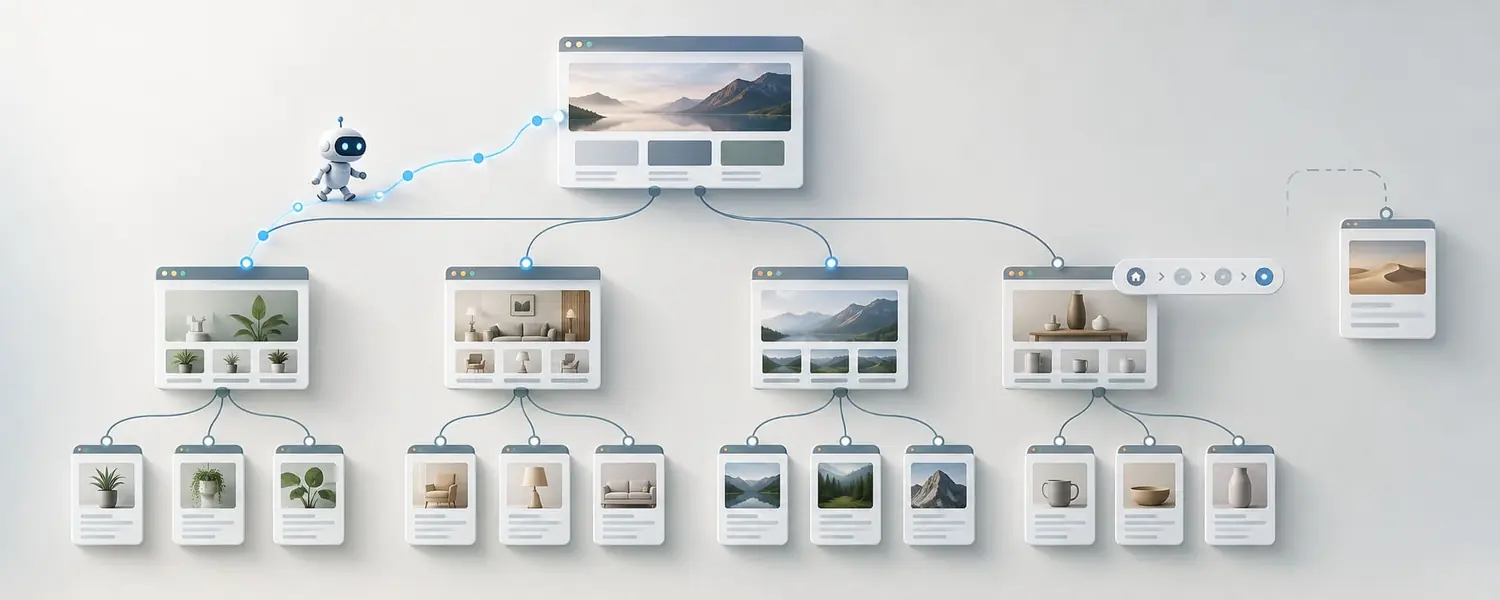
In Chapter 1 we talked about how Googlebot discovers new pages by following links across the internet. The same logic works inside our own site too.
When Google lands on a page, it can follow the links on that page to move on to other pages. That is why how a site’s pages connect to each other matters not only for user experience but for SEO too. In my older training sessions I also presented internal links as a natural part of the site tree.
I think the basic question here is:
When Google enters our site, can it easily reach our important pages?
What is internal linking?
The links we place from one page on our site to another page on the same site are what we call internal linking.
For example, say we have an article about coffee machines. Inside the article, we can link the phrase “espresso machine” to the espresso machines category.
Or if we’ve written an article on how to clean a coffee machine, we can link to cleaning products or another related guide in a suitable spot.
Our goal here isn’t just to send Googlebot to another page. It’s also to tell the user, “If you’re interested in this topic, you might want to look here too.”
I think this is also the easiest test of a good internal link:
Would I still add this link if Google didn’t exist?
If the answer is yes, it’s most likely a natural link.
Why does anchor text matter?
The clickable words we use when adding a link are called anchor text.
For example, instead of:
For more information about coffee machines, click here.
a link like:
You can browse our drip coffee machines.
tells both the user and the search engine more about where the link goes.
But we shouldn’t overdo it here either. Using the same keyword again and again in every internal link may not look natural.
The job of anchor text isn’t to stuff keywords; it’s to describe the page we’re sending people to accurately.
Why does site architecture matter?
Internal linking is a bigger topic than adding links to individual pages. What really matters is the overall structure of the site.
Picture a simple e-commerce site:
- Home
- Coffee Machines
- Espresso Machines
- Product
- Espresso Machines
- Coffee Machines
This structure is easy for users to understand and easy for Google to follow.
But if all the pages are disconnected from each other, an important product or piece of content can get lost deep in the site.
I always think of site architecture a bit like a tree. The home page is the trunk. Categories are the main branches. Subcategories and content are the other branches. Every page needs to sit in a logical place in this tree.
In my older training sessions I also explained the site map through a structure where the home page, blog, news, about us and other sections are all connected to each other.
This is where breadcrumbs come in
Say a user is on this page:
Home > Coffee Machines > Espresso Machines > Product
The element at the top of the page that shows this path is called a breadcrumb.
A breadcrumb answers the user’s question “Where am I on this site?” It also lets them easily go back up to parent categories.
I think it’s especially useful on large e-commerce sites. When a user lands on a product page directly from Google, they don’t know how the site is structured. The breadcrumb shows them the way back up.
In my old training notes I also used breadcrumbs directly as part of the site structure.
“Similar pages” can actually be SEO work
When people hear internal linking, they usually think of the blue links inside a blog post. But linking can be done in many different ways.
In my older training sessions I specifically showed these areas as examples:
- Similar Pages
- Customers who bought this also bought
- Category
- Related Links
For example, a “Similar products” section on a product page isn’t only there to increase sales. It also connects products to each other.
Or on a movie page, links like other movies with the same actor, movies by the same director and movies in a similar genre make sense for the user too.
I think internal linking works best this way:
When it’s part of the natural user flow, without looking like it was added for SEO.
Is linking to every page from the home page the answer?
I don’t think so.
Saying “Google should reach the important pages” and stuffing hundreds of links into the home page doesn’t create good site architecture.
The real goal is for every page to be findable through a logical path. For example, Home > Category > Subcategory > Product.
Structuring categories properly is healthier than moving everything to the home page.
What is an orphan page?
You have a page. It’s live. It might even be in the sitemap. But no other part of the site links to it.
We usually call this an orphan page.
Users can’t find this page through the normal flow of the site. Even if Google discovered it from other sources, it may struggle to understand where the page fits within the site.
I think there’s a very simple question here:
If this page is important, why doesn’t it get a link from anywhere on our site?
If we don’t have an answer, there may be a problem with the site structure.
Linking from strong pages to important pages
Not every page has the same value.
Some pages may get a lot of traffic, earn a lot of backlinks, sit close to the home page or have performed strongly for years.
Adding sensible internal links from these strong pages to important pages can help.
But we come back to the same point: the link also has to make sense for the user.
Putting dozens of links all over a page just for SEO can lower the quality of the content.
How do I look at internal linking?
When I check a page, I usually ask myself a few questions:
- Can users reach this page from within the site?
- Where can users go next from this page?
- Does it link to the relevant category?
- Are we pointing to similar content or products?
- Does the anchor text accurately describe the link’s target?
- Are important pages buried too deep in the site for no reason?
- Are there important pages on the site that get no links from anywhere?
I think internal linking covers all of these questions.
We’re not only letting Googlebot move around the site. We’re also answering the user’s question “Where can I go from here?”
In a well-designed site architecture, the user’s path and Google’s path are usually the same. I think a big part of doing SEO right shows up here.
We don’t build one site for Google and another for users.
We give both a structure that is clear, logical and connected.
Previous: Chapter 17: How Do Images Affect SEO? · Contents · Next: Chapter 19: What Should We Do With Old Content?
This chapter was first published in Turkish on X (September 18, 2026).